How DeepL handles structured files
DeepL and Google Translate are built for one thing: plain prose. They are trained on millions of sentences from books, articles and websites. They are exceptionally good at what they do — as long as the input is continuous natural language.
XML and JSON are not plain language. They are data formats with their own grammar. And that grammar is something these tools do not understand. Some tools attempt to work around this by partially recognising structured files. For trivial cases, that sometimes works. But as soon as a file becomes more complex — deeper nesting, attributes with functional values, domain-specific terminology — things will inevitably go wrong.
Four ways it breaks
1. Attributes and functional values are translated
In XML, attributes often contain values that the application expects literally. The translation tool sees them as text — and translates them accordingly. Consider this example:
<vraag type="schaal"
       richting="horizontaal">
  Hoe voelt u zich vandaag?
</vraag>
<question type="scale"
          direction="horizontal">
  How do you feel today?
</question>
The sentence is translated correctly. But type="schaal" is now type="scale" — the application expects the exact value schaal and crashes.
2. JSON keys are modified
In JSON, the distinction between key and value is critical. Only values may be translated — keys are the anchors that the code relies on.
{
  "vraag": "Hoe voelt u zich?",
  "type": "schaal",
  "min": 1,
  "max": 10
}
{
  "question": "How do you feel?",
  "type": "scale",
  "min": 1,
  "max": 10
}
The code still refers to "vraag" — but that key no longer exists. The application returns empty fields, or a silent error that only surfaces in production.
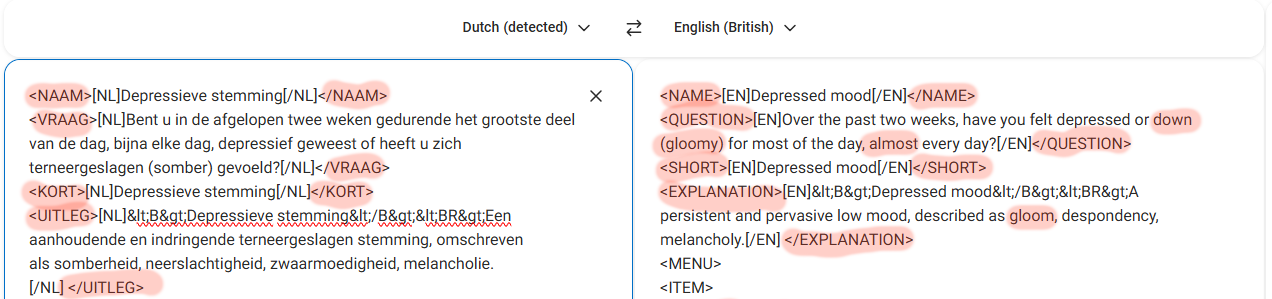
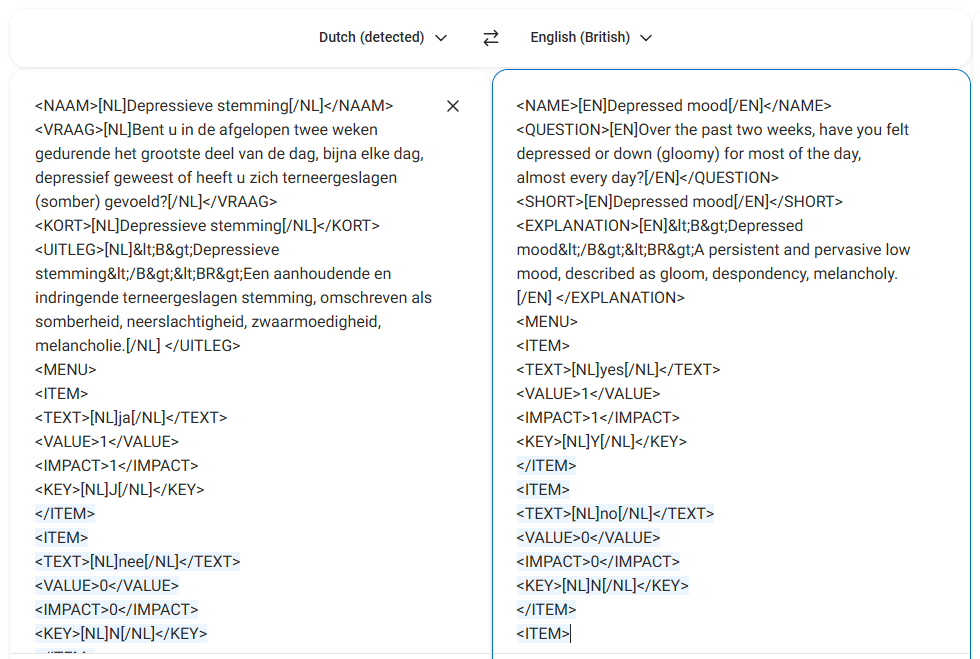
<NAAM> becomes <NAME>, <VRAAG> becomes <QUESTION>. The application no longer recognises these keys and cannot process the file.3. What the output should actually look like
In our case, a correctly translated structure keeps the original keys fully intact and adds the translation alongside the source text — within the same element, marked with a language tag. This keeps the file fully valid for the application, while making both language versions available within a single file.
The example below shows the difference: DeepL delivers a file with translated keys, whereas the desired output places the Dutch and English content side by side in a structured way — preserving all original tag names.
<NAME>[EN]Depressed mood[/EN]</NAME>
<QUESTION>[EN]Over the past two weeks,
  have you felt depressed or
  down (gloomy) for most of
  the day, almost every day?
[/EN]</QUESTION>
<SHORT>[EN]Depressed mood[/EN]</SHORT>
<NAAM>
  [NL]Depressieve stemming[/NL]
  [ENG]Depressed mood[/ENG]
</NAAM>
<VRAAG>
  [NL]Bent u ... somber gevoeld?[/NL]
  [ENG]Have you been depressed
  or felt dejected (sad)...?[/ENG]
</VRAAG>
<KORT>
  [NL]Depressieve stemming[/NL]
  [ENG]Depressed mood[/ENG]
</KORT>
Left: DeepL translates the tag names (<NAME>, <QUESTION>) and delivers only the English text.
Right: the original structure remains intact, with NL and ENG placed side by side within the same element.
This multilingual structure within a single tag is not the right approach for every project — but in our situation it was unavoidable. The application administering the questionnaire expects the language variants as nested elements within the same XML node. That is not a design choice you can adjust after the fact: the software reads the file in exactly that way, or it does not read it at all.
The fundamental problem is that you cannot instruct DeepL or Google Translate to structure its output this way. These tools have one output format: the target language replaces the source language. They simply do not understand the concept of "add the translation alongside the original, within the same element, marked with a language tag." No matter how you phrase it in a prompt or setting — it will not work. The only way to do this correctly is through an approach where translation and structure are handled separately, then reassembled.
At this point, some readers — particularly developers — will think: "But surely a generative AI model like GPT-4 or Claude can handle this with the right prompt?" It is a fair thought, and in simple cases it may even seem to work. But for large, complex files, large language models introduce their own risks: hallucinations, silently dropped text segments, inconsistent handling of nested structures, and output that looks correct but subtly isn't. Getting reliable, verifiable results from an LLM on a 500-item structured file requires exactly the kind of careful prompting, output validation and domain oversight that most organisations lack in-house. That is precisely where our experience with AI-assisted translation — knowing when to use it, how to guide it, and how to verify the result — makes the difference between a promising experiment and a production-ready translation.
4. Terminology is correct English, but wrong domain language
This is the subtlest error, and therefore the most dangerous. A translation tool always chooses the most common translation. In everyday text, that is fine. In a medical or psychological instrument, it can completely undermine the meaning.
For example: the English word affect is a clinical term in psychology — used exclusively as a noun to denote a person's emotional state or mood. An automatic translator encountering this word will often render it as a verb: "to influence", "to affect" or "to impact". Understandable from a general language perspective. Clinically wrong — and it changes the meaning of every item it appears in.
The same applies to legal terms with multiple meanings, or medical terminology where a single incorrect word changes the interpretation of a test result.
Why post-editing does not solve this
The temptation is to think: I will run it through DeepL and check it manually afterwards. For a small, simple file with no domain jargon, that is sometimes a reasonable approach. But for complex files, that strategy does not hold, for two reasons.
First: you do not know what you do not know. Incorrectly translated attribute values look visually correct. You will miss them in a manual review — unless you fully test the application with the translated file, which is itself a significant investment of time.
Second: post-editing a broken file costs more than getting it right from the start. You are no longer translating — you are debugging. The time saved by the automatic step evaporates quickly.
What does work
The approach we developed — and have since applied for other clients — consists of a few clear steps:
- Analysis before translation — which elements are content, which are structure? Which functional values must not be touched?
- Separation of content and structure — only the translatable text segments (strings) are submitted to the translation process; keys, attributes and markup remain untouched.
- Domain-specific terminology — for medical, psychological or legal texts, a domain expert validates the terminology. That does not have to be the translator — but someone must do this deliberately.
- Technical validation afterwards — the delivered file is checked for validity: structure intact, all elements present, does it load without errors in the application?
When can you do it yourself, and when should you not?
Honestly: for a small JSON file with simple text and no domain jargon, translating manually with a tool as an aid is quite manageable.
But as soon as any of the following applies, the risk is significant:
- The file contains more than a few dozen "strings"
- The terminology is domain-specific (medical, legal, psychological)
- The file is used within an application or system
- An error has consequences for patients, clients or legal validity
Then the question is no longer whether you can do it — but whether you want to take that risk.
Do you have a file that needs translating?
Tell us about your project and we will look at the best approach together — no obligation, no strings attached.
Discuss your project